
Quick Summary
- Personal finance platform gives you maximum control over your money
- Supports automatic syncing to Google Sheets or Microsoft Excel
- App Store lets you customize your experience
- Offers a 14-day free trial
Pros
Cons
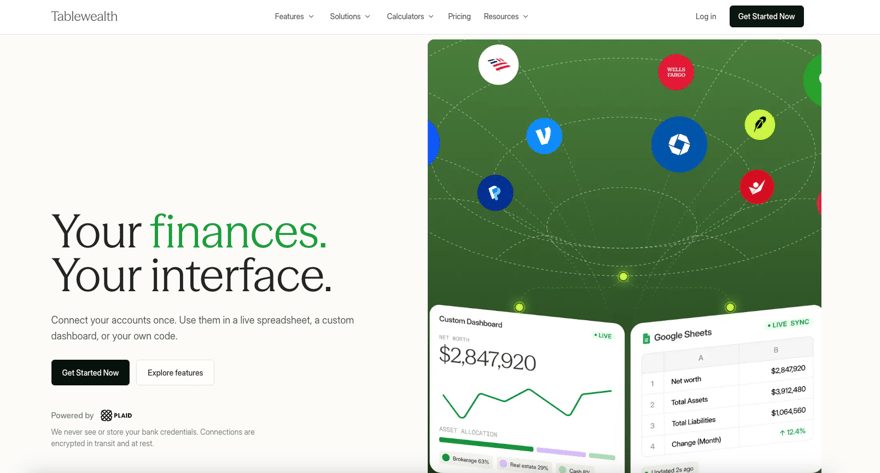
Tablewealth is a personal finance platform that lets you connect your financial accounts and analyze the data through its app, spreadsheets, and other custom tools. It can track everything from bank transactions and investment holdings to real estate and private investment holdings. In this review, I'll cover its main features to help you decide if it can help you organize your finances. I'll also compare it with a couple of alternatives.
What Is Tablewealth?
Tablewealth was founded by Peter Rousseau and Dan Faber. Rousseau has a background in finance operations, while Faber has over 10 years of experience in financial technology. Like many fintechs, Tablewealth operates remotely, but its teams are based near Dallas and Washington, D.C. I wasn't able to find a launch date for Tablewealth, but it seems to be a very new platform.
What Does It Offer?
Tablewealth offers a wide range of products and tools on its platform. Here's a closer look at some of its main features:
Spreadsheet Sync
A standout feature of Tablewealth is its ability to sync financial data directly with Google Sheets or Microsoft Excel. You can transfer your accunt balances, investment holdings, bank transactions, and other account values into a workbook without having to continually download CSV files.
Tablewealth also offers templates for net worth, budgeting, cash flow, transaction categorization, and raw data exports, or you can choose to use an existing spreadsheet. Because you own the workbook, you can keep your formulas, tabs, and charts, while allowing Tablewealth to refresh the underlying data. You can also get weekly email updates so you can stay on top of changes to your net worth, spending, transactions, etc.
Native App
If you're not a spreadsheet user, you can still use Tablewealth's native application. The app provides you with a central location where you can review your connected accounts, balances, investments, and more. It's a flexible platform that also allows you to manually add assets and liabilities, edit categories, and access reports.
App Store
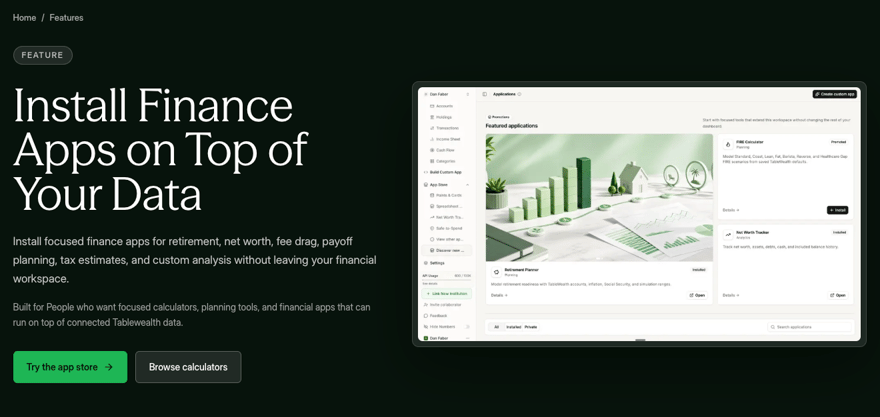
Tablewealth has its own App Store where you can add specialized financial tools that use the information that's already stored in your workspace. These apps serve a range of purposes, including retirement planning, portfolio analysis, cash flow reviews, debt payoff calculations, and tax estimates.
This approach means that Tablewealth doesn't have to clutter its dashboard with every possible financial task, some of which you might not use. Instead, you can install only the tools you need and omit features that don't apply to your situation.
Net Worth Tracking
You can use Tablewealth to keep track of your networth. It can include your bank and investment accounts, loans, real estate, private investments, and other assets that you enter manually. This will give you a more complete picture than apps that can only track accounts that they sync to automatically. You can also track your net worth via the native app or in a spreadsheet.
Retirement Planning
Tablewealth's retirement planning solution goes beyond a generic retirement calculator, allowing you to build an actual ongoing retirement plan that can change over time. Tablewealth refers to it as a "living retirement plan", which uses your actual account balances, spending assumptions, retirement date, and other key information. You can model different scenarios and see how changes to your income, expenses, savings, or retirement timing will affect the outcome. Of course, if you just want a quick estimate, you can still use Tablewealth's free retirement calculator.

Cash Flow And Spending
Tablewealth doesn't just sync to your bank accounts. It can organize transactions from your accounts, credit cards, loans, and other imported data to show you where your money is going and how it's being distributed. You can categorize transactions, create custom rules, ignore transactions, and separate the treatment of transfers so moving money between your accounts doesn't distort your income or expenses.
And as with other Tablewealth features, you can review your cash flow and spending in the app, a spreadsheet, or a custom dashboard. You can also receive a weekly email from Tablewealth summarizing changes to your net worth, spending, investment holdings, and more.
Private Asset Tracking
Many financial management platforms struggle to support certain assets, such as real estate, fine art, collectibles, and other alternative investments. That's not a problem with Tablewealth. It allows you to enter assets manually or import certain records. These assets will then appear alongside your bank balances, main investment holdings, liabilities, and other items. This is a valuable feature if your net worth extends beyond your bank account or a typical brokerage account.
API/Build Your Own App
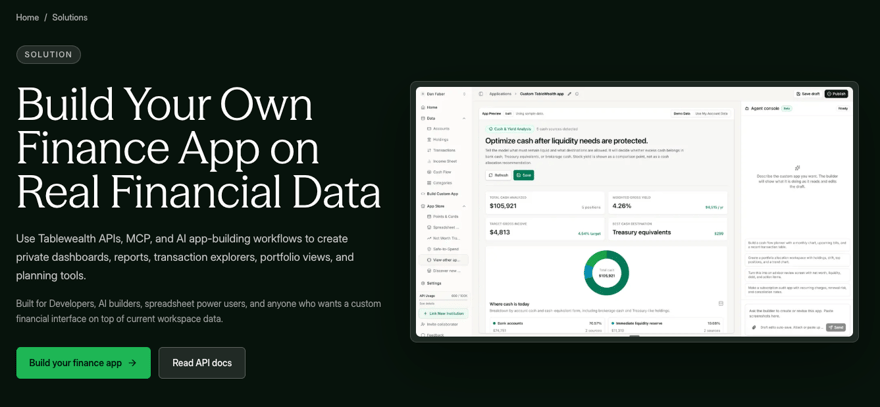
Tablewealth offers a read-only API that can provide access to accounts, transactions, holdings, and other workspace data. Developers can then use it to create their own customized dashboards, transaction explorers, portfolio tools, or internal financial apps without having to build separate bank connections.
Tablewealth also supports MCP connections and workflows with AI tools such as ChatGPT, Codex, Claude, and Claude Code. If you spring for its premium Build service plan, you'll get extra API capacity, event webhooks, and multiple-entity support for estates, trusts, businesses, and family offices.
Are There Any Fees?
Tablewealth offers an Explore plan, which lists a standard price of $5/month, but is currently being offered as a 14-day free trial. After the 14 days, the plan renews into the next tier, which is called Sync. Sync is $12/month or $99/year.
Sync provides most of Tablewealth's basic features, including automatic spreadsheet syncing, up to 10 spreadsheets, 5 custom dashboards, retirement tools, and up to 1,000 API records per month.
If you're a developer looking to take advantage of Tablewealth's advanced API features, you can choose the Build plan, which is $24/month or $199/year. It adds unlimited spreadsheets, advanced syncing, multi-entity support, webhooks, and up to 100,000 monthly API records.
Custom pricing is also available for more complex households and financial advisors, but you need to contact Tablewealth for pricing.
How Does Tablewealth Compare?
Tablewealth's website provides comparisons to two popular budgeting/financial management platforms, Monarch and Copilot Money. All three have a lot to offer, but the best platform really depends on what you're looking for in a personal finance app.
Monarch is well-suited for couples and families who want access to shared budgeting, goal tracking, reports, and household collaboration. Copilot may appeal to those looking for a modern app to review transactions, categorize spending, and track subscriptions.
But Tablewealth may be more comparable to Boldin, a DIY retirement and financial planning app. Tablewealth is more customizable than Boldin, particularly if you want to work with spreadsheets or build your own financial tools.
Boldin, on the other hand, is a stronger alternative for detailed retirement planning. It includes in-depth features such as Social Security and Medicare modeling, tax strategies, Roth conversion analysis, Monte Carlo simulations, and side-by-side scenarios.
If you just want a powerful budgeting tool, check out Monarch. If you want a single app to track your finances, then Copilot might be the answer. For in-depth retirement planning capability, take a long, hard look at Boldin.
But if you're looking for more flexible, in-depth tracking and planning options, along with a developer API for maximum flexibility, Tablewealth is likely the best option.
Header |  |  |  |
|---|---|---|---|
Rating | |||
Pricing | $99 to $199/year | $99 to $199/year | $0 to $144/year |
Spreadsheet Syncing | |||
Developer API | |||
Free Trial | 14 days | 7 days | 14 days |
Cell |
How Do I Open An Account?
To get started with Tablewealth, head to the website and select the "Get Started Now" button in the top right corner. You'll need to provide an email address and password, then choose a plan. You can select one of the paid plans up front, or choose the free 14-day trial, after which you'll be renewed to the Sync plan.
Once you've opened an account, you'll be able to connect any supported financial institutions via Plaid or add assets and liabilities manually. You can then choose whether you want to use Tablewealth's native dashboard, connect a Google Sheets or Microsoft Excel Workbook, or just check out the other apps and developer tools.
Is It Safe And Secure?
Tablewealth uses a secure third-party platform called Plaid, to connect your financial accounts. Tablewealth never has access to your bank login credentials, and it doesn't hold any of your financial accounts. Your money always stays with your bank and/or brokerage. Tablewealth supports other security options, such as multi-factor authentication, and account-scoped API keys. According to the Tablewealth's privacy policy, it does not sell your financial data or use it for advertising.
How Do I Contact Tablewealth?
Customer support options are limited with Tablewealth. If you need help, you can email [email protected]. If you have a privacy-related concern, you can email [email protected]. There is no phone or chat support available, although this isn't surprising for a financial management platform. I should point out that concierge customers receive priority customer support an personalized onboarding.
Is It Worth It?
I like that Tablewealth gives you so much control over where and how you use your financial data. Yes, you can use their central dashboard, but if you prefer spreadsheets or building tools yourself, you have that option. It offers a fairly robust retirement-planning tool, several helpful calculators, and a developer API that sets it apart from less flexible financial management tools.
I wouldn't recommend it if you just want to make a budget (try Monarch or another top budgeting app instead). If you just want to track your money without using spreadsheets, Copilot might be a simpler choice. If you're looking for a powerful retirement-planning tool, compare Boldin with Tablewealth before making a final decision.
However, if you're a spreadsheet enthusiast, an investor, a developer, or have a more complex financial situation, Tablewealth is probably your best bet.
Tablewealth Review
-
Pricing and Fees
-
Products and Services
-
Tools and Resources
-
Ease of Use
-
Customer Service
Overall
Summary
Tablewealth is a personal finance platform for tracking accounts, investments, spending, net worth, and private assets. Its live spreadsheet syncing and developer API give you more control over your financial data than a traditional budgeting app.
Pros
- Live spreadsheet syncing
- Supports private assets
- Public developer API
Cons
- No ongoing free plan
- May be too much for casual budgeters
- Newer, less-established platform
Reviewed by: Robert Farrington

Colin Graves is a financial writer and editor with more than 20 years of experience in banking and wealth management. Before joining The College Investor, he managed retail and commercial portfolios exceeding $1 billion, earning multiple awards for leadership and customer service. Colin holds several credentials from the Canadian Securities Institute, including the Canadian Securities Course, Professional Financial Planning Course, and the Certificate of Financial Services Advice.
Today, he applies that expertise to editing and writing about investing, credit, and money management for readers seeking practical, trustworthy financial information. Colin also writes at ColinGraves.com, where he helps people transition from traditional employment to self-employment through financial literacy and business coaching.