
Blossom Social is a social investing app that lets investors link their brokerage accounts, make their investment portfolios public, and connect with a community of fellow investors.
Unlike other social investing-oriented platforms, like Public or eToro, Blossom isn't a full-fledged brokerage where you buy and sell stocks.
In this review, I'll walk you through what Blossom Social is, how it works, and how to get started, so you can decide if it's the right fit for you.

Quick Summary
- Social investing platform for DIY investors
- Link your brokerage accounts
- Free version or upgrade to Pro for $8.99/month or $59.99/year
- Analytics and educational tools available
Blossom Details | |
|---|---|
Product Name | Blossom Social |
Monthly Fee | Up to $8.99/month (Free version available) |
Key Features |
|
Promotions | None |
What Is Blossom Social?
Blossom Social is a fintech start up based in Vancouver, B.C., Canada. Founded in 2021, the company had initially planned to become a social investing brokerage, but focused instead on the social and investment tracking features. Its app is available via the web, and on IOS and Android devices, and today has hundreds of thousands of users.
What Does It Offer?
Blossom offers a social investing network where users can link their brokerage accounts, view and share portfolios and trades, track their own holdings, engage with a large community of investors, and . These are the key features of the platform.
Portfolio Linking
When you join Blossom, you'll have the ability to link your existing brokerage accounts to the Blossom app, so that all of your holdings appear on one dashboard. Blossom uses SnapTrade, a secure, third-party API partner to connect your accounts.
Here is a list of the brokerages that are currently supported:
- Wealthsimple
- Questrade
- TD Direct Investing (Beta)
- Robinhood
- Public
- Fidelity
- Charles Schwab
- Webull (Partnership temporarily on hold)
- Vanguard
- E*TRADE
Remember that when you link your accounts, you're getting a read-only view. You can't place trades or conduct any transactions through Blossom.
Social Feed
Blossom Social's biggest draw is its community/social features. You can follow other investors, including several "finfluencer" content creators, and see the trades they make (often in % moves rather than dollar values), read posts about their investing rationale, and engage in discussions.
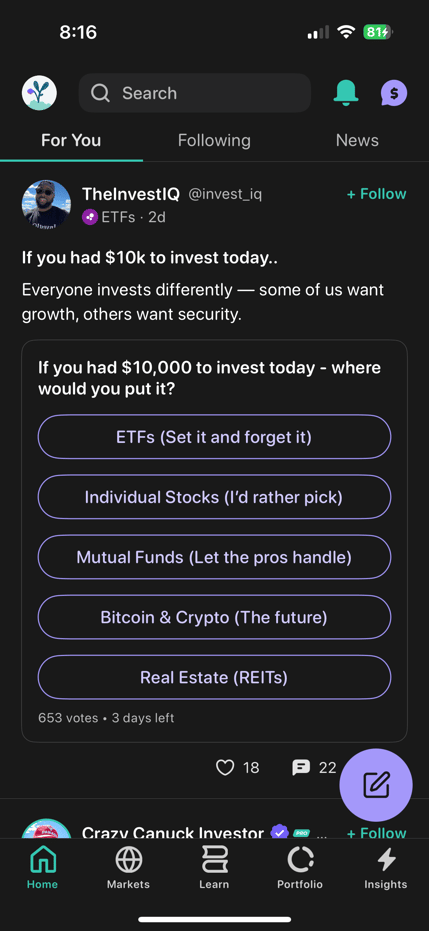
The transparency Blossom offers sets it apart from other investing forums you might find on platforms like Reddit.
Portfolio Analytics
When you link your portfolio, Blossom will provide you with portfolio analytics on your holdings. The free version gives you basic tracking, but you can upgrade to "Pro" for deeper breakdowns, including sector exposure, capital gains vs. dividends, performance vs. benchmark, etc.)
Educational Tools
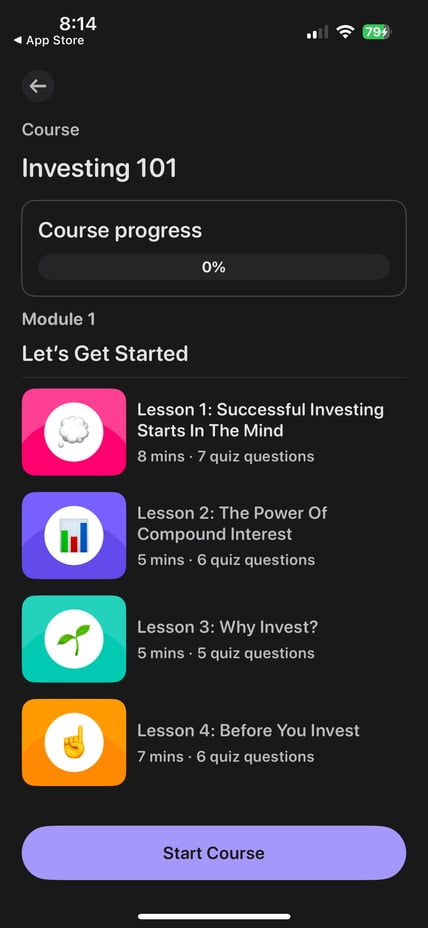
Blossom offers "Duolino-style" investing lessons, quizzes, and "learn & earn" modules that offer real money when you complete short educational lessons on up-and-coming ETFs and stocks. And Blossom's content feed can help you improve your investing knowledge.
Are There Any Fees?
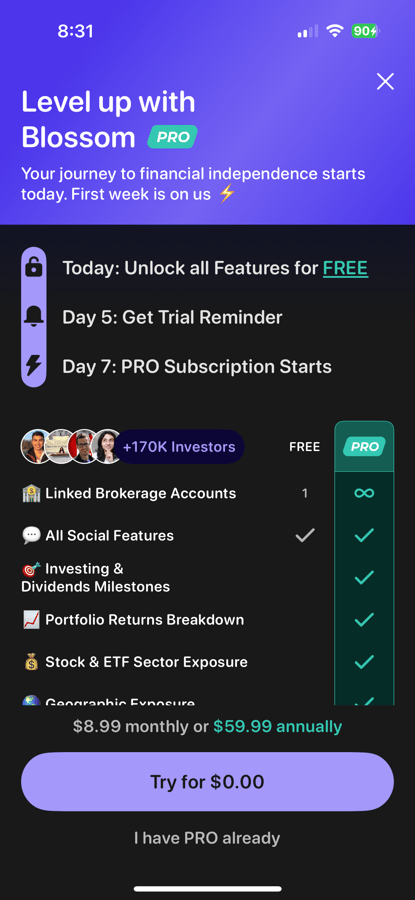
Blossom is free to download and use. You can connect one brokerage account, follow other investors, participate in the social feed (including your own posts), and get basic tracking for free. There are also no annoying ads or hidden fees.
If you want to unlock all of Blossom's features, you can choose the paid version, Blossom Pro, which is $8.99 monthly or $59.99 per year. Here's what you get with Pro:
- Unlimited Linked Brokerage Accounts
- Investing & Dividends Milestones
- Portfolio Returns Breakdown
- Stock & ETF Sector Exposure
- Geographic Exposure
- Upcoming Dividends Calendar
- Monthly Dividends Tracker
- Dividend Payout Forecasting
- Dividend Asset Contribution
- See Investors Pro Widgets
- Unlock all Lessons and Courses
So, while you can link a single investment account and use the app for free, if you want to track multiple accounts and access the in-depth analytics tools, you'll need to pony up for Pro.
How Does Blossom Compare?
If you're interested in the social aspects of Blossom, but you also want a brokerage, you might want to consider Public or eToro. Both of these U.S.-based apps are actual investment brokerages with a social/community component, similar to what Blossom Social offers.
With Public and eToro, you can open an account, deposit funds, and place trades. If your priority is to find a community, and you are satisfied with your current brokerage, than Blossom is likely the better choice.
Header | |  |  |
|---|---|---|---|
Rating | |||
Pricing | Free or $8.99/month | Free | Free |
Social network | |||
Brokerage | |||
Cell |
How Do I Open An Account?
You can open an account in a couple of minutes by downloading the Blossom app on your iOS or Android device, and providing a your name and email address. Blossom will send you an email for verification purposes. You'll need to take some additional steps if you want to link your investment account(s), but you can browse Blossom's social feed as soon as you open an account.
Is It Safe And Secure?
Yes, Blossom is safe to use. While you can link your investment accounts, it's done using a secure third-party platform, and Blossom is not a brokerage and never holds your money - no funds are transferred to Blossom from your brokerage.
How Do I Contact Blossom?
After opening a Blossom account, I couldn't locate a customer support phone number or email address. However, there is an in-app messaging function you can use if you have questions, as well as a Help Center, which I found easy to navigate.
Is It Worth It?
If you're looking for a community of like-minded investors and are willing to share your portfolio holdings publicly, Blossom might be the app you're looking for. Of course, you can participate in the social feed (post and read posts) without linking your accounts. I also like the daily market info/news feeds that Blossom offers, and paid users get access to some impressive analytics.
On the other hand, if you're looking for an actual investing brokerage with social features, then you might want to consider Public or eToro. Of course, if a social investing community isn't your thing, check out our list of the best online brokerages.
Blossom Social Features
Account Types |
|
Pricing |
|
Social investing community | Yes |
Investment Tracking | Yes |
Portfolio Analytics | Yes (Paid version only) |
Educational Tools | Yes |
Brokerage Services | No |
Stock Trading | No |
Customer Service Number | None |
Mobile App Availability | iOS and Android |
Web/Desktop Account Access | Yes |
Promotions | None |
Blossom Social Review
-
Pricing and Fees
-
Products and Services
-
Tools and Resources
-
Customer Service
-
Ease of Use
Overall
Summary
Blossom Social is a social investing app that lets investors link their brokerage accounts, make their investment portfolios public, and connect with a community of fellow investors. It offers both free and paid versions.
Pros
- The free version lets you link one investment account
- Connect with thousands of other investors via the social feed
- Dashboard is jam-packed with market news and other resources
- Quick and easy signup process
Cons
- Not a brokerage, so you can’t place trades
- You need to pay to access most of the features
- Gamification of social investing can lead to poor decisions
Editor: Robert Farrington

Colin Graves is a financial writer and editor with more than 20 years of experience in banking and wealth management. Before joining The College Investor, he managed retail and commercial portfolios exceeding $1 billion, earning multiple awards for leadership and customer service. Colin holds several credentials from the Canadian Securities Institute, including the Canadian Securities Course, Professional Financial Planning Course, and the Certificate of Financial Services Advice.
Today, he applies that expertise to editing and writing about investing, credit, and money management for readers seeking practical, trustworthy financial information. Colin also writes at ColinGraves.com, where he helps people transition from traditional employment to self-employment through financial literacy and business coaching.