
ThinkorSwim (ToS) is an advanced trading platform offered by Charles Schwab. It was part of TD Ameritrade, but luckily Schwab kept it as part of the merger.
It is often regarded by active traders as one of the best trading platform available. It’s jammed-packed with technical analysis and charting tools and software features that can improve a trader's efficiency.
ThinkorSwim is so highly respected in the trading community that many people open a Charles Schwab account just to have access to ToS.
In this article, we’ll look at what everyone is raving about by going through a high-level overview of ThinkorSwim.

Quick Summary
- All-in-one platform for trading virtually any instrument
- Includes many elite charting and analysis tools
- Beginners may feel overwhelmed by its numerous features
ThinkorSwim Details | |
|---|---|
Product Name | ThinkorSwim |
Min Investment | $0 |
Commissions | $0 for Stocks, ETFs, and Options |
Account Type | Taxable, IRA, and More |
Platform | Web, Windows, Mac, iOS, Android |
Promotions | None |
What Is ThinkorSwim?
ThinkorSwim, also called ToS, is the trading platform for Charles Schwab, a U.S. based brokerage. The ToS software was first created by Tom Sosnoff and Scott Sheridan in 1999. The platform quickly gained notoriety and was acquired by TD Ameritrade in 2009.
In 2022 Charles Schwab acquired TD Ameritrade, and they migrated the ThinkorSwim platform to Schwab in 2023. Think or Swim is a subsidiary of the Charles Schwab Corporation.
What Do They Offer?
ToS is an advanced trading platform that allows you to trade just about any instrument. This includes stocks, options, ETFs, bonds, futures, and futures options. Besides trading, the platform lets you perform complex analysis on stocks and potential trades.
The platform streams live market data so that you can see the exact price movement and volume at any moment.
ToS is available for Windows, Macs, and the web. There is also a mobile ToS app available.The web version mimics the desktop’s visual layout but doesn’t have quite as many features.

Screenshot of the ThinkorSwim Platform. Screenshot by The College Investor.
ToS lets you log into a live or paper trading account. In the above screenshot, we are in the paper trading account. This account allows you to trade with fake money. You can use it for practicing strategies and for understanding how certain trades work.
Once you’ve downloaded and installed the ToS software, open it and log in. In the above screenshot, we’ve marked off three sections for reference. We have the left side panel open. If it is closed, look midway down the app's left edge for a small handle icon. Click it to open the panel.
The charts appear because we have the charts tab highlighted. In the center of each chart is a little box. Those are there because flex grid editing is turned on. This little box lets you add and remove charts on the flex grid. To access it, click the nine dots icon in the upper right of the app and select "customize grid."
To add moving averages and drawings to a grid, right click any grid and select any of Style, Drawings, or Studies. You can also click those same icons along the top menu of any grid. There’s an icon at the top of each grid marked “D,” which allows you to quickly change the grid’s time frame.
Each grid is independent. However, you can link grids and even watchlists to grids. To link anything, click the chain icon next to the symbol box in the top left of a grid.
Select a color that is the same as a watchlist color (maybe red). When you click a watchlist symbol/stock, it will populate the grid with that stock. You can have two grids linked this way for multiple time frames or studies.
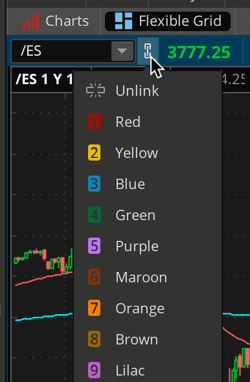
Charting Options. Screenshot by The College Investor.
Placing A Stock Trade
To start trading, click the “Trade” tab at the top in RA3. Type any symbol into the symbol box. In the screenshot below, we typed in MSFT (Microsoft's stock symbol). To trade MSFT, you can right click anywhere in the “Underlying” section that has quotes or single click the Ask or Bid price.
That will bring up the trade panel at the bottom. Make any changes to the price if using a limit order. You can also change the order type from limit to market or other types under the Order column. Then click the confirm and send button.

Trade Volume. Screenshot by The College Investor.
Trading Options
Trading options in ToS uses the same mechanics as trading stocks. You can see the January monthly options chain for MSFT in the above screenshot. By right clicking any strike on the call (left) or put (right) side (or single clicking the ask/bid price), you can select to buy or sell the option. It will populate the same trade tab.
It can be hard to setup your first Thinkorswim account screen. See our full guide on How To Setup Thinkorswim for trading.
Are There Any Fees?
There are no fees for using the ToS platform. You just need a Charles Schwab account. ToS charges the same trading commissions charged by Charles Schwab. There are no commissions on stocks, ETFs, and no base option fee.
Like most brokers, ToS still charges per-contract fees for options ($0.65) and futures ($2.25). You can see the full commission schedule here.
Header | |  |  |
|---|---|---|---|
Rating | |||
Commissions | $0 | $0 | $0 |
Min Investment | $0 | $0 | $0 |
Extended Hours Trading | 24/5 | 24/5 | 9:00-9:30 AM 4:00-6:00 PM |
Per-Contract Options Fee | $0.65 | $0.65 | $0 |
Cell |
How Do I Open An Account?
You can visit Charles Schwab to open an account. After your account is open, you can download ToS and use your Schwab credentials to log in.
Is My Money Safe?
Yes - cash deposits with Charles Schwab are FDIC-insured while brokerage funds are SIPC-insured up to $500,000.
Is It Worth It?
Certainly! Some platforms charge a fee or can be more complex. ThinkorSwim is free for anyone that has a ToS account. If you mostly trade stocks and ETFs and want exceptional analysis, ToS is definitely worth checking out.
If you're wanting to compare ToS with other top trading platforms, E*TRADE, and Interactive Brokers are both worth a look. And if you frequently trade options, you may want to consider Robinhood as it's one of the few platforms that doesn't charge a contract fee for options trades.
Features
Account Types |
|
Minimum Investment | $0 |
Commissions | $0 for stocks, ETFs, and options |
Per Contract Fees |
|
Platform | Web, Windows, Mac, iOS, Android |
Extended Hours Trading | 24/5 (Sunday, 8 PM ET to Friday 8 PM ET) |
Paper Trading | Yes |
Custom Alerts | Yes |
Keyboard Hot Keys | Yes |
Fractional Shares | No |
Security | FDIC insurance up to $250,000 SIPC insurance up to $500,00 Supplemental insurance
|
Customer Service Number | 1-800-669-3900 |
Customer Service Hours | 24/7 availability |
Promotions | None |
ThinkorSwim Review
-
Commissions & Fees
-
Ease Of Use
-
Customer Service
-
Tools & Resources
-
Investment Options
-
Specialty Services
Overall
Summary
ThinkorSwim is a powerful trading platform offered for free to Charles Schwab clients. See our full breakdown of its tools and options!
Pros
- No commissions
- Advanced charting and research tools
- Offers paper trading accounts
- 24/5 trading hours
Cons
- Can’t trade fractional shares
- Charges contract fees for options and futures
Editor: Clint Proctor Reviewed by: Chris Muller

Get the latest financial news and actionable insights.
How it works:
- 1Enter your email and subscribe.
- 2Get the latest personal finance and education news delivered every week.
- 3Take control of your finances with real insights.
- 4We won't spam you, ever!

Robert Farrington is the founder of The College Investor and is widely recognized as one of the nation’s leading voices on student loan debt and saving for college. He holds an MBA from UC San Diego Rady School of Management and has spent over 15 years researching, writing, and advising on student loans, 529 plans, financial aid programs, and saving and investing for young professionals.
Robert has been featured in the The New York Times, The Wall Street Journal, The Washington Post, NBC News, and Forbes, where he has been a regular personal finance contributor for over a decade. His work combines both professional expertise and personal experience – he successfully navigated his own student loan repayment journey and has helped thousands of readers do the same.
He is committed to making the intersection of personal finance and education transparent and accessible. You can learn more about Robert on the About Page or on his personal site RobertFarrington.com.