

Quick Summary
- Free federal filing
- Easy navigation and inputs
- Pro Support tier includes live support from tax experts
- Limited PDF imports
Pros
Cons
For 2026, TaxHawk offers free federal filing for all users and low-cost state filing. If you don’t qualify for free tiers with other tax software companies, you may find that TaxHawk offers better prices. While most filers have to pay for state tax returns, the price for TaxHawk is still much lower than many “free versions” elsewhere.
Like sister-app FreeTaxUSA, it recently added the ability to import consolidated 1099 PDFs from brokerages, which is a huge step forward. But it still lags behind leaders TurboTax and H&R Block for users looking to import a range of PDF types for their taxes.
We like TaxHawk for simple tax returns with just a W-2 and bank interest, but it’s not the best for active investors. You may notice this review is very similar to our FreeTaxUSA review, as the two are basically identical products from the same company.
In this TaxHawk review, we examine the ins and outs of TaxHawk's software and break down when it makes sense for bargain hunters to use TaxHawk and when to look elsewhere. If you’re shopping around, check out how TaxHawk ranks on our list of the best tax software.
TaxHawk - Is It Really Free?
With $0 and the word “Free” on the front page, you may expect TaxHawk to be available for free. That’s true for a limited number of filers living in a state that doesn't require a state income tax return. TaxHawk offers free federal tax filing, but state tax returns cost $15.99 per state. You’ll pay more if you add any optional upgrades.
Given that TaxHawk isn’t 100% free for anyone who requires a state tax return, it’s still an excellent value. For 2025 taxes (filed in 2026), it's a top software for value seekers who don't qualify for free filing elsewhere. Small business owners and side hustlers might find a much lower price for the same final tax results you would get with any tax software. It’s relatively easy to use, and the optional upgrades are competitively priced.
What's New For 2026?
TaxHawk was updated in 2026 to reflect changes in the tax code, notably new tax brackets and limits for various deductions and credits. The filing experience is moderately improved from last year, continuing improvements from 2025.
TaxHawk gave its expert assistance product a slight refresh, which costs $44.99 per year. Compared to most competitors, that’s a bargain price to get one-on-one answers to your tax questions.
Good to Know: You can import PDFs of W-2 and Consolidated 1099 forms, but others require manual entry.
The app continues to make slow progress on PDF import support. Two years ago, it added W-2 imports. This year, you can import 1099 Consolidated PDFs from your brokerage. Hopefully, we’ll see more robust PDF support for all 1099 forms next year.
TaxHawk consistently lands on our list of the Best Tax Software thanks to its overall good user experience and low pricing for a quality tax product. Even with all the add-ons, filers are unlikely to pay more than $60 ($44.99 for Pro Support + $15.99 for State Tax). That’s a reasonable price for tax prep and phone support from a tax pro.
If you’re not sold on TaxHawk or want to learn more about how it compares, see all the best tax software options here.
Does TaxHawk Online Make Tax Filing Easy In 2026?
TaxHawk is fairly easy to use, but not the easiest tax software available. Its features stack up well against other value-priced tax software but fall short of TurboTax and H&R Block, notably in the lack of PDF uploads for all 1099 forms and other common forms.
TaxHawk’s question-and-answer formatting, bookmarks, and quick navigation make the software intuitive. The software also includes section summaries to help users check whether they’ve made any errors.
If you choose TaxHawk, you must manually type most tax information. In some scenarios, filers spend a lot of time entering information into the software. Many active investors and people with many tax forms are likely better off elsewhere due to the manual time commitment and the potential for typos.
TaxHawk Features
Given its low price, TaxHawk is pleasantly high-quality and easy to use. Thoughtful features like bookmarks, navigation bars, and section summaries make the software better than many middle—and low-priced competitors. It has much more to like than dislike.
Q&A Plus Menu Guidance
TaxHawk uses a blend of questions and answers and quick navigation menus to guide users through the tax filing experience. The Q&A portion focuses on the most common questions. Users with more unique circumstances, including rental properties or other business income, can select their tax needs from a menu.
TaxHawk offers Q&A-style navigation in each section to help users file their returns accurately.
Simple, Low-Cost Pricing
Federal tax filing is free for all users in all supported situations. State filing costs $15.99 per state. You can file for free if you live in a state that doesn't require a tax return.
If you live and work across state lines or need to file multiple state returns for any other reason, you’ll likely find significant savings compared to the biggest names in tax prep. Users have a few upgrade options, none of which are required, and they're reasonably priced.
Section Summaries
TaxHawk automatically displays a section summary that lets users review the information they’ve entered before moving to the next section. A “fat finger” error, such as adding one too many zeros, is easy to catch and correct when you see all the numbers on the same page.
Deluxe Support Add-On
TIP: We don’t normally like upsells, but the Deluxe upgrade from TaxHawk is likely well worth the cost.
TaxHawk’s Deluxe upgrade gives users access to live chat support for questions about using TaxHawk for just $7.99. Deluxe also includes a front-of-the-line priority support option and unlimited amended returns if you make a mistake on your taxes.
Pro Support Add-On
Tax filers can add on Pro Support for $44.99. With this add-on, you can ask questions and receive personalized tax advice from a CPA or enrolled agent. They will work with these tax pros via chat or phone, with screen sharing supported.
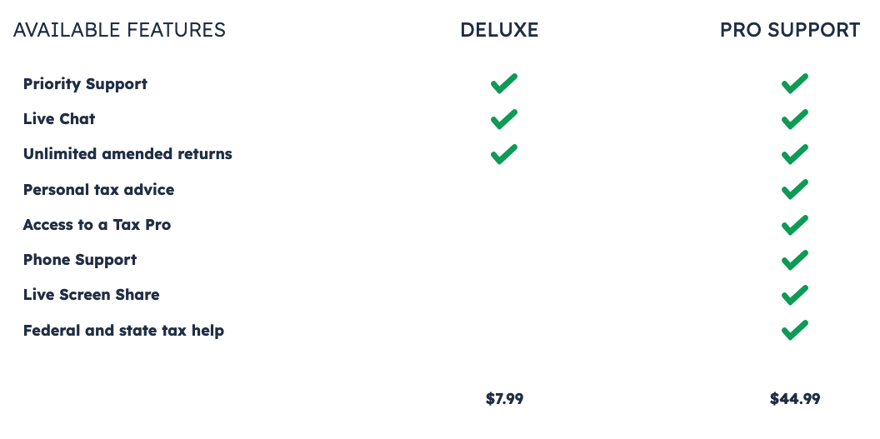
TaxHawk Price Comparison. Screenshot by The College Investor.
TaxHawk Drawbacks
Despite the general usability, TaxHawk isn’t perfect and falls short in a few key areas.
Can't Import Most Forms
TaxHawk doesn’t allow users to import most 1099 forms. This means tax filers must hand-type the information, and it’s easy to make a mistake while transcribing these forms.
Other leading filing services, including H&R Block, TurboTax, and TaxAct, allow users to import tax form PDFs with just a few clicks. At TaxHawk, you can import a W-2 and a Consolidated 1099 PDF. Others must be manually imported.
While you can't import most forms into TaxHawk, you can import prior-year tax returns from some software companies. This helps you compare year-over-year results to spot significant anomalies or changes to your income or tax situation.
No Free State Filing
State filing costs $15.99 per state. Several companies, including TurboTax, TaxSlayer, and H&R Block, have free state and federal filing for some users. However, this is a decent cost compared to the regular price from TurboTax, H&R Block, and others.
TaxHawk Pricing And Plans
All filers pay the same base rate for TaxHawk software. That base rate is $0 for federal filing and $15.99 per state. The Deluxe and Pro Support levels unlock additional support, but the software remains unchanged.
Plan | Free (Federal Only) | Deluxe | Pro Support |
|---|---|---|---|
Best For | All filers | Priority technical support | Advice from tax professionals |
Federal Cost | $0 | $7.99 | $44.99 |
State Cost | $15.99 per state | $15.99 per state | $15.99 per state |
Total Cost | $15.99 | $22.98 | $60.98 |
How Does TaxHawk Compare?
TaxHawk is a value-priced software program and is ideal for anyone who cannot qualify for free filing elsewhere and has only a small stack of tax forms. If you want the easiest experience, consider TurboTax or H&R Block.
For bargain-priced tax software, we’ve compared it to two other low-priced leaders, TaxAct and TaxSlayer, to help you pick the best tax software for your unique needs. TaxHawk is slightly more challenging to use than TaxSlayer, but it still offers a lot of functionality at very reasonable prices.
Header |  |  |  |
|---|---|---|---|
Rating | |||
Stimulus Credit | Free | Free+ | Free+ |
Unemployment Income (1099-G) | Free | Classic+ | Deluxe+ |
Student Loan Interest | Free | Free+ | Deluxe+ |
Import Last Year's Taxes | Free | Free+ | Free+ |
Snap A Pic of W-2 | Not Available | Not Available | Free+ |
Multiple States | $15.99 per state | Classic+ | Not advertised |
Multiple W-2s | Free | Free+ | Free+ |
Earned Income Tax Credit | Free | Free+ | Free+ |
Child Tax Credit | Free | Classic+ | Free+ |
Dependent Care Deductions | Free | Classic+ | Deluxe+ |
HSAs | Free | Classic+ | Deluxe+ |
Retirement Contributions | Free | Free+ | Free+ |
Retirement Income (SS, Pension, etc.) | Free | Free+ | Free+ |
Interest Income | Free | Classic+ | Deluxe+ |
Itemize Deductions | Free | Classic+ | Deluxe+ |
Dividend Income | Free | Classic+ | Deluxe+ |
Capital Gains | Free | Classic+ | Premier+ |
Rental Income | Free | Classic+ | Premier+ |
Self-Employment Income | Free | Classic+ | Self-Employed |
Audit Support | Deluxe+ | Premium+ | Not Offered |
Support From Tax Pros | Pro Support | Premium+ | Xpert Help Upgrade |
Small Business Owner (over $5k in expenses) | Free | Classic+ | Self-Employed |
Free Tier Price | $0 Fed & | $0 Fed & | $0 Fed & |
Deluxe Tier Price | $7.99 Fed | $34.36 Fed | $29.99 Fed & |
Premium Tier Price | There's technically no Premium tier, but users can add Pro Support for $44.99 | $50.36 Fed | $49.99 Fed |
Self-Employed Tier Price | N/A (Users can report self-employment income on the Free and Deluxe Tiers) | $58.36 Fed | $69.99 Fed |
Cell |
Contact
For basic software-related questions, you can send a message (inside your account) or email to TaxHawk's general customer service team. The company's main customer support email address is [email protected].
If you pay for Deluxe ($7.99), your messages will be prioritized. You'll also get access to the Audit Assist center. With the Pro Support add-on ($44.99), you'll get live chat and phone support from professional tax preparers.
Is It Safe And Secure?
TaxHawk boasts several major security certifications that demonstrate it meets industry standards. The company hasn’t suffered a security breach and protects users by requiring multi-factor authentication and strong passwords.
Users should feel confident using TaxHawk in 2026. To keep personal information and tax data safe, it is essential to use a unique password on every website and follow other online security best practices.
After all, if your password is compromised on another site and you use the same email address and password combination at TaxHawk, it’s much easier to get into your account.
Why Should You Trust Us?
The College Investor team spent years reviewing the top tax filing options, and we have personal experience with most of the tax software tools. I personally have been the lead tax software reviewer since 2022, and have compared most of the major companies on the marketplace.
Our editor-in-chief, Robert Farrington, has been testing tax software since 2011 and has tried almost every tax filing product. Furthermore, our team has created reviews and video walk-throughs of all of the major tax preparation companies, which you can find on our YouTube channel.
We’re tax DIYers and want a good deal, just like you. We work hard to offer informed and honest opinions on every product we test.
How Was This Product Tested?
In our original tests, we used TaxHawk to complete a real-life tax return that included W-2 income, self-employment income, rental property income, and investment income. We tried to enter all the data and use every available feature. We then compared the result to all the other products we've tested and a tax return prepared by a tax professional.
This year, we went back through and rechecked all the features we initially tested, as well as any new ones. We also validated the pricing options.
Is It Worth It?
TaxHawk’s combination of features and pricing makes it a strong contender for anyone’s tax needs. The software is a decent choice for bargain seekers, but recent upgrades make it better than ever. However, TaxHawk doesn’t support 1099 imports. This makes it a tough choice for users with many forms of active investment trading data to enter.
It’s still recommended for bargain hunters who can’t qualify for free filing and business owners looking for a lower-cost filing option. Many side hustlers, rental property owners, and multi-state filers will see significant value in TaxHawk.
Common Questions
Here are some of the most common questions about TaxHawk.
Can TaxHawk Online help me file my crypto investments?
TaxHawk supports cryptocurrency trades, but users must enter all of that data manually. Users who sold one or two positions may do well with TaxHawk. Those with a dozen or more trades may need to use dedicated cryptocurrency tax software and upload the results to more powerful software like H&R Block or TurboTax to complete their taxes.
Can TaxHawk help me with state filing in multiple states?
Yes, TaxHawk allows users to file taxes in multiple states. Before starting the process, make sure TaxHawk supports both states through its supported forms. State filing costs $15.99 per state.
Is TaxHawk really free?
TaxHawk has a free federal pricing tier. However, you'll have to pay for a state tax return at every price level. Other add-on features (optional) are available for an additional fee.
Does the same company own TaxHawk, FreeTaxUSA, and 1040Express?
Yes. TaxHawk Inc. owns TaxHawk, FreeTaxUSA, and 1040Express. Each software product has a slightly different branding, but it's more or less the same under the hood. Users can even transfer accounts from one software to another.
TaxHawk Review
-
Navigation
-
Ease of Use
-
Features and Options
-
Customer Service
-
Plans and Pricing
Overall
Summary
TaxHawk is solid bargain tax software, similar to its sister company, FreeTaxUSA, with some premium features.
Pros
- Free federal filing includes all forms
- Pro Support is competitively priced
- PDF imports for W-2 and Consolidated 1099 forms
Cons
- Must manually input all information
- The Paid Deluxe version doesn’t include access to tax experts
- Can’t import most tax forms
Editor: Colin Graves Reviewed by: Robert Farrington

Eric Rosenberg is a financial writer, speaker, and consultant based in Ventura, California. He holds an undergraduate finance degree from the University of Colorado and an MBA in finance from the University of Denver. After working as a bank manager and then nearly a decade in corporate finance and accounting, Eric left the corporate world for full-time online self-employment.
His work has been featured in online publications including Business Insider, Nerdwallet, Investopedia, The Balance, Huffington Post, and other financial publications. When away from the computer, he enjoys spending time with his wife and three children, traveling the world, and tinkering with technology. Connect with him and learn more at EricRosenberg.com.