

Quick Summary
- Offers online business bank accounts with no monthly fees
- Must have articles of incorporation to open an account
- Easy integration with third-party business software
Pros
Cons
Opening a business credit card account is fairly easy. Anyone with a solid credit score and a legitimate side hustle can typically get approved for some of the best business credit cards on the market.
But finding a business bank account has historically been much more challenging. Most brick-and-mortar banks make it challenging to apply for a business bank account without stepping into a branch. By contrast, Mercury makes business banking cheap and easy.
If you own a corporation (LLC, S-Corp, etc.), you don’t yet have a business bank account. Keep reading to learn what Mercury offers and how to decide if it's right for you.
What Is Mercury ?
Mercury Technologies is a fintech company that works with partner banks to help small companies (startups) manage their cash flow better. It makes it easy for any company with formation documents and an Employer Identification Number (EIN) to open a business bank account.
Unlike many business bank accounts, Mercury's business accounts are fee-free. Additionally, companies that keep more than $250k in their account can have their spare cash “invested” in extremely low-risk securities such as Treasury Bonds.
Account-holders can make payments using debit cards, wire transfers, ACH transfers, or payroll processing platforms. They can collect money from payment processors (Stripe, PayPal, etc.). The accounts are also designed to link to online accounting software.

⚠︎ This Is A Banking Service Provider, Not A Bank.
Mercury is a fintech company, not an FDIC-insured bank. Banking services provided through Choice Financial Group and Column N.A., Members FDIC. While it uses partner banks to provide banking services, your FDIC-insurance protection may be limited. Read this article from the FDIC to understand the risks of using a non-bank company.
What Does It Offer?
Mercury has several points of differentiation that set it apart from other business banking options. Here are four of its most notable features.
Streamlined Application Process
First, Mercury makes it super easy to apply for an account. Founders who have their articles of incorporation and your EIN number from the IRS will be able to complete an online application in minutes.
This simplified account opening is amazing. Many banks make the opening process difficult for small companies that are just trying to get started. Not so with Mercury.
Sure, you’ll need a few government documents to open up the account. But if you’ve taken care of those details, the bank account won’t take long to open.
User Permissions
Mercury makes it easy for a founder to share financial responsibility among team members without turning over the keys to the bank account. It offers virtual cards and variable permissions for employees. Founders can also interact with their accounts via API which makes it easy for finance teams to develop reporting, or for developers to build integrations with apps and more.

Fees
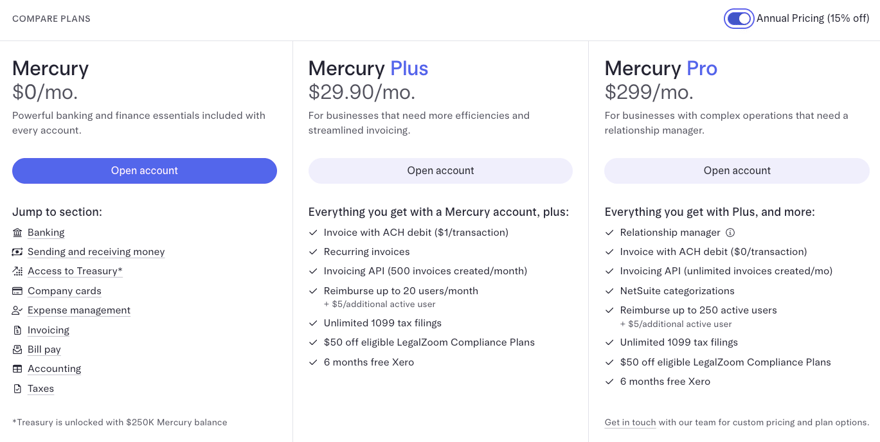
Mercury offers three service plans: Mercury, Mercury Plus, and Mercury Pro, with fees ranging from $0 to $299 per month (paid annually). For more details on pricing and what's included with each plan, see Mercury's pricing page here.
Is Mercury A Bank?
On its home page, Mercury says that it offers "full-stack bank accounts." But, to be clear, Mercury is a fintech company, not an FDIC-insured bank. Banking services provided through Choice Financial Group and Column N.A., Members FDIC. Mercury doesn't have any local branches and can't accept cash deposits.
Account holders can make fee-free cash withdrawals at all Allpoint network ATMs. Still, Mercury clearly states on its FAQ page that its product is geared towards tech startups and might not be the best fit for businesses that frequently handle cash.
While users can keep their deposits at Mercury, it doesn’t typically serve as a lending institution. They do have partnerships for venture debt and more.
Header | |  |  |
|---|---|---|---|
Rating | |||
APY | 0.01% | 1.50% | Up to 4.40% |
Monthly Fees | $0 - $299/month | $0 | $0 |
Min Deposit | $0 | $0 | $100 |
ATM Access | 55,000+ Free ATMs | 38,000+ Free ATMs | Unlimited |
Cash Deposits | |||
Cash Back | |||
FDIC Insured | |||
Cell |
Is It Worth It?
Mercury makes it easy to get started with low-cost business banking. With minimal fuss, you can quickly be up and running with a legitimate business bank account. This, along with Mercury's online tools and user permissions, could make it a compelling option for business owners.
However, you'll need to look elsewhere if you're wanting to earn a high yield on deposits, would like to get cash back on your debit card transactions, or need a bank account that can accept cash deposits. Compare your business bank account options here >>>
Mercury is a fintech company, not an FDIC-insured bank. Banking services provided through Choice Financial Group and Column N.A., Members FDIC. The IO Card is issued by Patriot Bank, Member FDIC, pursuant to a license from Mastercard®.
Mercury Treasury is offered by Mercury Advisory, LLC, an SEC-registered investment adviser. This communication does not constitute an offer to sell or the solicitation of any offer to purchase any security. Funds in Mercury Treasury are subject to investment risks, including possible loss of the principal invested, and past performance is not indicative of future results. Please see full disclosures a mercury.com/treasury. Mercury Advisory is a wholly-owned subsidiary of Mercury Technologies.
Mercury Treasury is not insured by the FDIC. Funds in Mercury Treasury are not deposits or other obligations of Choice Financial Group or Column N.A., and are not guaranteed by Choice Financial Group or Column N.A.
Mercury Review
-
Fees and Charges
-
Products and Services
-
Customer Service
-
Ease of Use
-
Tools and Resources
Overall
Summary
Mercury’s business bank accounts are low-cost, easy to open online, and integrate well with other business tools.
Pros
- Free plan available
- Multiple employee permission levels
- Many third-party platform integrations
Cons
- Sole proprietors can’t open accounts
- Doesn’t support cash deposits
Editor: Clint Proctor Reviewed by: Claire Tak

Robert Farrington is the founder of The College Investor and is widely recognized as one of the nation’s leading voices on student loan debt and saving for college. He holds an MBA from UC San Diego Rady School of Management and has spent over 15 years researching, writing, and advising on student loans, 529 plans, financial aid programs, and saving and investing for young professionals.
Robert has been featured in the The New York Times, The Wall Street Journal, The Washington Post, NBC News, and Forbes, where he has been a regular personal finance contributor for over a decade. His work combines both professional expertise and personal experience – he successfully navigated his own student loan repayment journey and has helped thousands of readers do the same.
He is committed to making the intersection of personal finance and education transparent and accessible. You can learn more about Robert on the About Page or on his personal site RobertFarrington.com.