
Quick Summary
- Navigation is still a bit clunky
- Gets the job done but less efficiently than Quicken for Windows
- Strong customer support
Pros
Cons
Quicken was traditionally known as one of the best personal finance software options for desktop users. However, the Mac version had traditionally lacked the features found in the PC version, and that was disappointing to many users.
Over the years, Quicken has tried to close the gap between its two software versions. And that was again the case with its latest iteration -- Quicken For Mac.
So is the Mac version finally on equal footing with the PC software? Unfortunately, no. Quicken for Mac still lags the Quicken for Windows experience. But it's still a power piece of software that may perfectly meet all your needs. In this article, we’ll look at the latest features in Quicken for Mac and compare it against the current Quicken for Windows.
What Is Quicken?
Quicken is a personal finance software company. It used to be part of Intuit. Quicken was spun off from Intuit in 2016 and was purchased by H.I.G. Capital. The CEO of Quicken is Eric Dunn. He joined Intuit as employee #4 when Quicken was still under the Intuit umbrella.
We recently named Quicken on of the Best Budgeting Apps because of their robust tracking and both desktop and mobile syncing.
What Does It Offer?
Quicken offers a personal finance software product by the same name. It is available for Windows and Mac. In this article, we’ll focus on the Mac version.
Anyone who has used Quicken for Windows and then tried Quicken for Mac probably came away from the experience disappointed. Spoiler alert — that experience hasn’t really changed much in the latest Quicken for Mac.
Quicken for Mac still trails Quicken for Windows in ease of use, interface (i.e., navigation), intuitiveness, versatility, and features. Quicken for Mac also falls a bit short when it comes to investment tools, especially in regard to its lack of automatic cost-basis calculations.
Another area that people have complaints about is the interface. For example, the home screen makes it a bit difficult to find things. There aren't any widgets or ways to customize the home screen. Additionally, if you are coming from Quicken for Windows, there isn't a one-to-one transition where everything's the same in Quicken for Mac. Some things will be familiar, while others will not and require some searching around to find.
Still No Home & Business
The Quicken Home & Business subscription allows you to run your personal and business transactions within the same software. However, Quicken H&B is not as nearly business feature-rich as Quickbooks.
Quicken for Mac is still missing the H&B option. You can only get it in Quicken for Windows.
What’s New In Quicken For Mac?
Each version of Quicken gets faster and more robust. That hasn’t changed with the latest version. Being a subscription, you’ll automatically get the latest updates. Both the Windows and Mac version got the following enhancements:
- Over 500 customer-requested improvements and fixes plus significantly improved reliability
- The most powerful connectivity to banks and brokerages of any personal finance software; more than 14,500 financial institutions and 11,000 online billers
Specifically for Mac users, the following features have been added:
- Up to twice as fast on start-up
- Charts and graphs also load twice as fast
- Backup is four times faster than prior versions
- Access to 11,000+ online billers, bill PDF downloads*
- New enhanced Portfolio View
- Refreshed overall look & feel of Bills & Income
- 5 GB of secure online backup for your Quicken files with Dropbox
- Free Quicken Bill Pay and priority access to Quicken phone support (Premier and above)
- Manage your money anywhere with Quicken on the Web
Quicken added new options to the Portfolio page for its Mac version as well as an all-new Investing Dashboard.
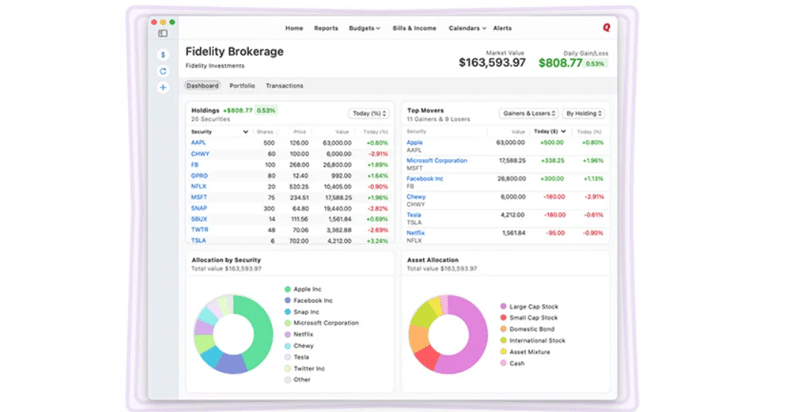
By selecting their account type (Investing, Brokerage, Retirement, or Education), Mac users can now view snapshots of their holdings across multiple accounts. Snapshots that have been added include:
- Holdings Type
- Allocation by Security Type
- Allocation by Asset Class
With these new insights, it will be easier for investors to analyze their asset allocation and make changes when their current mix of asset doesn't match well with their risk profile.
Quicken On The Web
Quicken on the Web is a recent development for Quicken. While most other financial apps are completely web-based, Quicken on the Web is only a companion. This means it is a scaled down version of Quicken. If Quicken can continue developing Quicken on the Web into a full-blown financial app, it will eliminate the inferior Mac user experience.
With Quicken on the Web, you can do all of the following:
- View balances, budgets, accounts, and transactions
- See spending trends by category, payee, and more
- Monitor investment performance with up-to-the-minute portfolio value
- Search and see details of past expenses
- Keep your finances continually up to date: your accounts sync across desktop, web, and mobile
- Enjoy a fresh, streamlined Quicken experience
New! Quicken Business & Personal
Quicken recognizes that more Americans are turning to side hustles and self-employment as additional sources of income, and have launched a new cloud-based app designed specifically for small business owners, self-employed workers, and solopreneurs.

Quicken Business & Personal allows users to manage their business and personal finances in one location, by taking advantage of the following features:
- Automatic categorization of all business and personal transactions.
- Cash flow tools to help monitor performance.
- Multiple businesses bundled in one subscription.
- Unlimited clients, projects, and invoices.
- Automatic creation and population of invoices.
- Faster taxes with built-in Schedules C & E.
- Full access to Quicken Simplifi, an award-winning personal finance app.
Pricing: With a discounted price of $9.99 per month (you can get 50% off when paying annually at the time of this writing), Quicken Business & Personal offers great value by combining two apps into one.
What Does It Cost?
Quicken moved to a subscription-based pricing model in 2017. Unlike many other subscription services, Quicken's software is not purely cloud-based. It is desktop, mobile, and cloud-lite. Desktop software still needs to be installed to use all of Quicken's features.
While some may balk at no longer having licensed one-time-charge software, the subscription model does make more sense in the end. It means more cash flow for Quicken. Hopefully, with more cash, incremental improvements will continue, making the software better each year.
As of May 2026, here are the current prices:
Deluxe | Premier | Business & Personal | |
|---|---|---|---|
Best For: | Basic budgeting, no investments | Users with investments and loan tracking | Users who want BillPay or Premium Support |
Price: | $83.88/year | $107.88 | $149.88 |
Discounted Price (as of May 15, 2026 | $5.99/mo (14% off) | $6.99/mo (22% off) | $9.99/mo (20% off) |
The Quicken for Mac prices do mirror the Windows prices. Also, Quicken does come with a 30-day money-back risk-free trial.
Note: Home and Business is only available for PC at the moment.
How Does Quicken Compare?
Quicken has long been a leader in the personal finance software space. It has a plethora of features and is available on multiple platforms, including Mac.
Still, it might not be the best fit for everyone. Specifically if you're a crypto investor, you'll be disappointed to find that you still can't track cryptocurrency assets on Quicken.
Even if Quicken does everything you need it to, there are plenty of Quicken alternatives that might be able to meet your needs just as well at a lower price. Check out this table to see how Quicken compares:
Header |  |  |  |
|---|---|---|---|
Rating | |||
Pricing | $83.88 - $149.88/yr | $15/mo or $150/yr | Free |
Net Worth Tracking | |||
Budgeting | |||
Cryptocurrency Tracking | |||
Cell |
How Do I Buy It?
You can visit the Quicken website to purchase and download Quicken.
Is My Money Safe?
Yes - like many other financial apps, Quicken uses encryption and secure connections to financial institutions.
Is It Worth It?
If you want to use Quicken on Mac without installing a Windows emulator, Quicken for Mac is the only way to go. Despite it being less efficient than Quicken for Windows, there isn’t much of a learning curve and one can fairly quickly overcome most drawbacks.
But if you're willing to give another brand a try, you may want to consider Moneydance. Moneydance offers a well-designed and fully-featured Mac version in addition to its Windows and Linux options. Plus, you only pay for the software once instead of having to renew a subscription each year. Learn more in our Moneydance review.
Quicken For Mac FAQs
Here are the answers to a few of the most common questions people ask about Quicken for Mac.
Does Quicken for Mac offer monthly subscriptions?
No, all of its plans have an annual billing schedule.
Is there a free Quicken app?
Yes, Quicken has free mobile apps that can be downloaded on the Apple App Store and Google Play Store. However, to log in to the app you'll need to buy a desktop software subscription and input your Quicken ID.
What happens if I don't renew my Quicken subscription?
You'll be able to continue to use the version of the software that you purchased to view your data and manually enter transactions. However, you won't receive any future product updates and you'll no longer be able to have transactions automatically download from synced accounts.
Is Quicken offering any promotions?
Yes, Quicken is currently offering 14% off the per-month subscription plans for Quicken Deluxe, and 22% off Premier. These promotions are current as of May, 2026. All plans also come with a 30-day money-back guarantee.
Quicken For Mac
-
Product Cost
-
Ease Of Use
-
Tools And Features
-
Customer Serivce
Overall
Summary
Quicken For Mac has improved on speed, features, and cloud storage, but isn’t a Quicken for Windows equal yet.
Pros
- Up to 2x faster startup
- Enhanced investment tracking
- Full refresh of Bills & Income
- 5 GB of cloud backup with Dropbox
Cons
- Somewhat clunky navigation
- Can’t track cryptocurrencies
- Limited business transaction tracking
Editor: Colin Graves Reviewed by: Chris Muller

Get the latest financial news and actionable insights.
How it works:
- 1Enter your email and subscribe.
- 2Get the latest personal finance and education news delivered every week.
- 3Take control of your finances with real insights.
- 4We won't spam you, ever!

Robert Farrington is the founder of The College Investor and is widely recognized as one of the nation’s leading voices on student loan debt and saving for college. He holds an MBA from UC San Diego Rady School of Management and has spent over 15 years researching, writing, and advising on student loans, 529 plans, financial aid programs, and saving and investing for young professionals.
Robert has been featured in the The New York Times, The Wall Street Journal, The Washington Post, NBC News, and Forbes, where he has been a regular personal finance contributor for over a decade. His work combines both professional expertise and personal experience – he successfully navigated his own student loan repayment journey and has helped thousands of readers do the same.
He is committed to making the intersection of personal finance and education transparent and accessible. You can learn more about Robert on the About Page or on his personal site RobertFarrington.com.