
Organizing your financial and digital life can be a pain. And that pain can be amplified when you want to share your digital life with a partner or a trusted advisor.
Trustworthy is an app and website working to solve that pain point. It serves as a family operating hub where account holders can manage their financial life and share with collaborators while keeping their information safe and secure.
Trustworthy is a beautiful and easy-to-use technological solution to our increasingly complex digital and financial lives. This review explains why the app works so well and explores some alternatives.

Quick Summary
- Secure document, ID, password, and insurance storage.
- Full and partial sharing enabled.
- AI-driven reminders to keep up on financial and planning tasks.
Trustworthy Details | |
|---|---|
Product Name | Trustworthy Company |
Features | Secure Document Storage, Financial Planning Reminders, Collaboration Tools, Concierge Service |
Cost | Free to $240 Per Year |
Platform | Web, iOS, Android |
Promotions | None |
What Is Trustworthy?
Trustworthy is a document storage service that is specifically designed to help users organize their financial life. Users can upload estate planning documents, Social Security cards, birth certificates, insurance documents, and other critical financial information. They can also connect directly to their insurance and financial accounts.
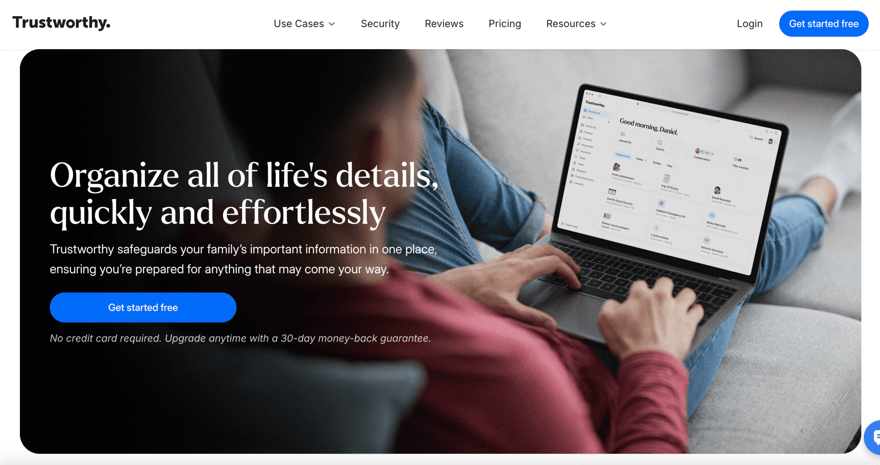
Trustworthy uses guided workflows and concierge services (personalized help) to ensure that new users don’t miss uploading critical information. It also has some impressive AI designed to keep users on top of their financial life. It reminds users to review financial information annually, to check beneficiaries, and to pay for insurance.
When a user requests information (such as where to get a will done), Trustworthy sends updates to make sure it happens. Plus, the platform offers encryption and multi-factor authentication along with multiple sharing settings.
What Does It Offer?
Trustworthy is a platform that makes it easy to organize financial and estate planning documents.
Web Interface And Mobile App
Users who are just getting set up may want to use Trustworthy’s web interface. On desktop, anyone can quickly connect accounts and upload insurance policies.
Customers can also connect to their accounts using a phone or mobile device. This makes it easy to snap pictures and upload them to Trustworthy from your iOS or Android device.
Innovative Security Measures
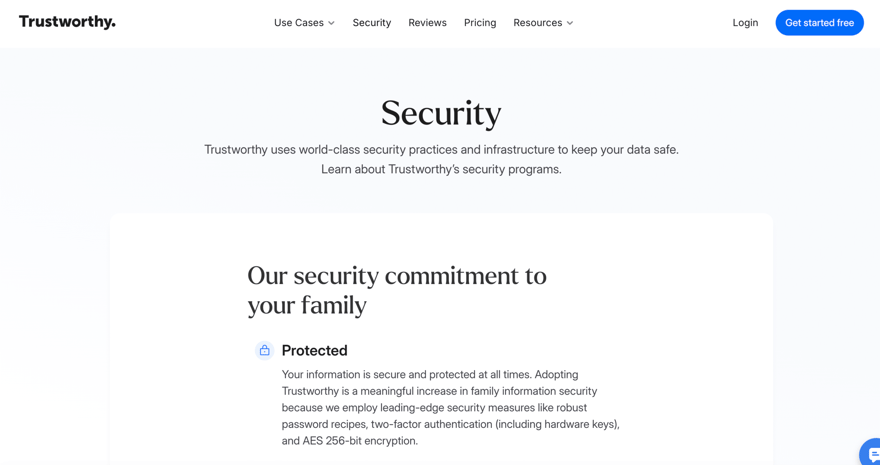
Trustworthy uses all standard security measures including encryption and requires multi-factor authentication to keep information safe. But it also has innovative security features.
Trustworthy redacts certain information in the UI. And it only displays it when a user clicks on it specifically. It also uses Aliasing to remove all critical information off of Trustworthy’s servers. With Aliasing, Trustworthy mitigates the potentially devastating effects of a cyber breach.
Customizable Collaboration Levels
The Trustworthy app enables users to configure various collaboration permissions. A user can set up full sharing (for example, sharing information with a spouse), partial sharing (for instance, sharing financial documents with a financial advisor), and even legacy access (full access in the event of their death).
Suppose you don't wish to add someone as a collaborator but want to offer controlled access to a document for a specific period. In that case, secure link sharing is another method for sharing information.
Concierge Estate Planning Services
Trustworthy won’t create your will or estate planning documents. However, it will help users access the information they need to make informed financial decisions. For example, users can request a list of lawyers who specialize in drafting wills or trusts in their area. Anyone who has lost a critical document (such as a birth certificate or passport) knows how difficult it can be to get a new one. Trustworthy's concierge team makes this process a little bit easier.
A Central Hub For Family Information
Trustworthy has guided workflows for critical information. But users can also add important family information. For example, users can upload bicycle VINs, combinations for a vault in their homes, passphrases for crypto hardware, or other free form information.
AI-Driven Reminders
Trustworthy utilizes Natural Language Processing (a form of Artificial Intelligence) and a few custom algorithms to help users stay on top of their financial life. It's AI tool helps people organize their documents automatically on their own, by figuring out where to categorize them. It also extracts key details, so users don't have to dig through their documents to find important information later. It also reminds users to renew insurance policies, review documents, and complete tasks associated with basic estate planning.
Are There Any Fees?
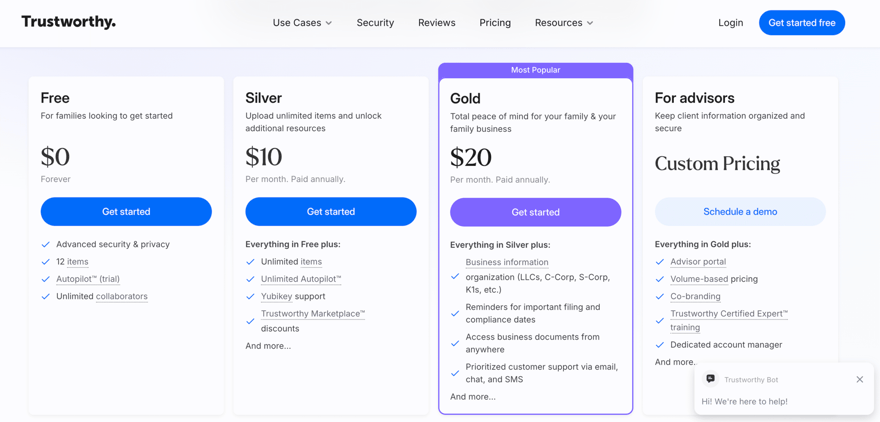
Trustworthy offers a forever-free plan with limited storage. It's a good option for those who want to store a small number of items (up to 12) or want to determine if Trustworthy is right for them, without worrying about a deadline.
In addition to the free plan, it offers a Silver plan for $120 a year and a Gold plan for $240 a year. Access to a Trustworthy Certified Expert™ (the concierge service) is available as a separate purchase for anyone who wants additional assistance, regardless of their plan.
Note: A 50% discount is available to firefighters, police, paramedics, EMTs, doctors, nurses, military members, reservists, veterans, teachers, and security guards.
How Do I Contact Trustworthy?
Trustworthy has a chatbot on its website that serves up answers to frequently asked questions or sends messages to the support team. You can find the chatbot in the bottom right-hand corner of most of the website pages.
To contact support directly, you can email [email protected].
The Trustworthy Headquarters is located at:
548 Market Street
San Francisco, CA 94104
How Does Trustworthy Compare?
Trustworthy is an innovative financial planning app. It focuses on a people-centric design and solves a real problem associated with financial disorganization. Unlike most financial apps, Trustworthy can serve as a hub for your financial life. It’s not a budget tool or net worth tracking tool. It's a secure organization and collaboration tool. The tool is beautiful, easy to use, and solves a huge problem. But the price tag is high.
Only individuals with very complex financial lives require the sophistication of Trustworthy. Most could use a password vault like LastPass ($3 to $4 per month for plans that include document storage) or a printable document like the In Case of Emergency Binder ($39 PDF) to achieve the same result at a lower cost.
How Do I Open An Account?
Users can start an account by downloading the app or by creating a profile from the Trustworthy website. Trustworthy asks a few simple questions and then makes a secure account for the users.
Is It Safe And Secure?
Trustworthy uses some of the best security practices, including encryption and multi-factor authentication, and meets the following compliance standards: SOC 2 Type II, SOC 3, EU General Data Protection Regulation, California Consumer Privacy Act, and HIPAA.
It also employs a security practice called tokenization or aliasing to safeguard your financial information. It redacts certain information in the UI and only displays it when a user clicks on it explicitly. It also uses tokenization to remove all critical information from Trustworthy’s servers. With tokenization, Trustworthy mitigates the potentially devastating effects of a cyber breach.
Is It Worth It?
I see a lot of value in Trustworthy, especially in its collaboration settings. Individuals with complex financial situations who struggle with financial organization may find that the platform is worth the high annual price tag.
Typically, I recommend that readers should take advantage of a free trial to see if they like a product. However, onboarding with Trustworthy is a lot of work. And I don’t think the effort is worthwhile if your financial life is generally organized.
For now, only people with very complex financial lives should consider Trustworthy for their secure document and estate planning needs. Trustworthy offers impressive technology. But I expect to see competitors in the space that offer similar products for less than half the price.
Trustworthy Features
Features | Secure Document Storage, Financial Planning Reminders, Collaboration Tools, Concierge Service |
Cost |
|
Storage Limit |
|
Password Management | No |
Security | 256-bit encryption, two-factor authentication, aliasing |
Customer Service Email | |
Customer Service Hours | Chatbot |
Web/Desktop Access | Yes |
Mobile App Availability | iOS and Android |
Chrome Extension | Yes; Save Gmail attachments, local files and screenshots directly to your account. |
Promotions | 50% discount for certain groups |
Trustworthy Review
-
Cost
-
Features and Tools
-
Ease of Use
-
Customer Service
Overall
Summary
Trustworthy is a cloud storage platform that helps families organize their financial documents and keep their vital information up to date.
Pros
- Free plan is now available
- Easy-to-understand workflows
- Flexible collaboration settings
- Available on iOS and Android devices
Cons
- The free plan is limited to 12 items
- Onboarding can take time (especially using the app)
Editor: Clint Proctor Reviewed by: Claire Tak

Robert Farrington is the founder of The College Investor and is widely recognized as one of the nation’s leading voices on student loan debt and saving for college. He holds an MBA from UC San Diego Rady School of Management and has spent over 15 years researching, writing, and advising on student loans, 529 plans, financial aid programs, and saving and investing for young professionals.
Robert has been featured in the The New York Times, The Wall Street Journal, The Washington Post, NBC News, and Forbes, where he has been a regular personal finance contributor for over a decade. His work combines both professional expertise and personal experience – he successfully navigated his own student loan repayment journey and has helped thousands of readers do the same.
He is committed to making the intersection of personal finance and education transparent and accessible. You can learn more about Robert on the About Page or on his personal site RobertFarrington.com.